Documentation of SHINE
Authors: Matteo Fossati, Davide Tornotti
Date: 20/01/2025
Introduction
Project Name: SHINE
SHINE (Spectral Highlighting and Identification of Emission) is a simple Python-based script that identifies connected structures above a user-given signal-to-noise (S/N) threshold in 2D and 3D datasets.
It also allows masking bad regions where extraction should not be performed.
Installation
Requirements:
Python version:
>=3.8Dependencies:
numpy,scipy,astropy,connected-components-3d
Steps to Install:
Clone the repository:
git clone https://github.com/matteofox/SHINE.git
cd SHINE
Install the code:
python -m pip install .
Directory Contents
The github distribution includes a shine/ directory that contains the following codes:
SHINE.py: The main Python file containing the code for the extraction process.GUI_SHINE.py: The Python file containing the code for the GUI.Make_Im_SHINE.py: The Python file for the tool used to analyze the extraction results. It generates 2D images.
Usage of SHINE and tools
SHINE and Make_Im_SHINE are installed as executables and can be run directly from the terminal. Below is an explanation of the different ways to execute the code.
The extraction is performed using SHINE. The basic idea behind the code is as follows:
(Optional, applicable to 3D data only) Select a portion of the cube (in the z-direction or wavelength direction) where the user wants to focus the extraction.
Mask certain voxels using a user-provided mask (e.g., continuum sources).
Spatially filter the cube/image and the associated 2D or 3D variance using a user-defined kernel dimension.
Apply a threshold to the cube/image based on the user-defined S/N threshold.
Group connected voxels (3D)/pixels (2D) that meet the S/N threshold and other user-defined parameters.
Generate and save the catalog along with the labeled cube/image.
For 3D data only, it is possible to use Make_Im_SHINE to create the associated image by collapsing the voxels in the z-direction using the labeled cube.
This tool is designed to create three different types of images (flux, mean or median) both selecting only certain voxels based on a 3D mask with associated Ids (e.g. the output labels cube of SHINE, thus creating an extraction image) and all the voxels (thus creating a narrow band image). If flux is selected, the units of the output image are \(1 \times 10^{-18} \, \mathrm{erg \, s^{-1} \, cm^{-2} \, arcsec^{-2}}\).
Using a single Id object it is also possible to obtain an image with the representative pseudo narrow band around it (the width is specified by the user with --nsl and --nsladd.
Run Extraction from the command line
Basic Usage for 3D cube:
SHINE <3D-cube> <3D-variance> --input <input-file> --output <output-file>
Example (without selecting a subcube):
SHINE ../Cubes/Datacube.fits ../Cubes/Datavarcube.fits --snthreshold 2 --spatsmooth 3 --minvox 300 --mindz 2 --outdir ../Dataproducts/ --writelabels
Example (selecting a subcube):
SHINE ../Cubes/Datacube.fits ../Cubes/Datavarcube.fits --zmin 40 --zmax 100 --snthreshold 2 --spatsmooth 3 --minvox 300 --mindz 2 --outdir ../Dataproducts/ --writelabels --writesubcube
Basic Usage for 2D images:
SHINE <2D-image> <2D-variance> --input <input-file> --output <output-file>
Example:
SHINE ../Cubes/Dataimage.fits ../Cubes/Datavarimage.fits --snthreshold 2 --spatsmooth 3 --minvox 300 --mindz 2 --outdir ../Dataproducts/ --writelabels
Command line arguments for SHINE:
General Arguments:
-h, --help: Show this help message and exit.
Input Control Arguments:
data: Path of the input data (3D or 2D). Expected to be in extension 0, unlessextdatais defined.vardata: Path of the variance cube. Expected to be in extension 0, unlessextvardatais defined. Instead, if a positive number is provided a constant variance is assumed. If -1, compute the variance from the data with a sigma-clipping algorithm.--mask2d: (Optional) Path of an optional two-dimensional mask to be applied along the wave axis.--mask2dpost: (Optional) Path of an optional two-dimensional mask to be applied after the spatial smoothing.--mask3d: (Optional) Path of an optional three-dimensional mask. (Not implemented yet).--extdata: Specifies the HDU index in the FITS file to use for data extraction (default=0).--extvardata: Specifies the HDU index in the FITS file variance to use for data extraction (default=0).--zmin: (Optional) Select the cube and the variance: initial pixel in z direction (from 0). Only valid for 3D data.--zmax: (Optional) Select the cube and the variance: final pixel in z direction (from 0). Only valid for 3D data.--lmin: (Optional) Select the cube and the variance: initial wavelength in z direction (in Angstrom). Only valid for 3D data.--lmax: (Optional) Select the cube and the variance: final wavelength in z direction (in Angstrom). Only valid for 3D data.
Extraction Arguments:
--snthreshold: The SNR of voxels (3D)/pixels (2D) to be included in the extraction (default=2).--spatsmooth: Gaussian Sigma of the spatial convolution kernel applied in X and Y (default=0).--spatsmoothX: (Optional) Gaussian Sigma of the spatial convolution kernel applied in X. Has priority overspatsmooth.--spatsmoothY: (Optional) Gaussian Sigma of the spatial convolution kernel applied in Y. Has priority overspatsmooth.--specsmooth: Gaussian Sigma of the spectral convolution kernel applied in Lambda.--usefftconv: IfTrue, use FFT for convolution rather than the direct algorithm.--dovarsmooth: If False, do not apply the smoothing on the vardata.--connectivity: Voxel connectivity scheme to be used (default=26). Allowed values: 4, 8 (2D); 26, 18, 6 (3D).--maskspedge: Determines how much, in pixels (default=20), to expand the mask around the edges of the cube/image. Useful if the edges are noisier.
Cleaning Arguments:
--minvox: Minimum number of connected voxels (3D)/pixels (2D) for a source to be in the final catalogue (default=1). For 2D data this argument has priority over--minarea.--mindz: Minimum number of connected voxels in the spectral direction for a source to be in the final catalogue (default=1). Only valid for 3D data.--maxdz: Maximum number of connected voxels in the spectral direction for a source to be in the final catalogue (default=200). Only valid for 3D data.--minarea: Minimum number of connected projected spatial voxels (3D)/pixels (2D) for a source to be in the final catalogue (default=1).
Output Control Arguments (Inherit the original file name):
--outdir: Output directory path (Default ./).--writelabels: If set, write labels cube/image. The file is saved asdataname.LABELS_out.fits.--writesmdata: If set, write the smoothed cube/image. The file is saved asdataname.FILTER_out.fits.--writesmvar: If set, write the smoothed variance. The file is saved asdatavarname.LABELS_out.fits.--writesmsnr: If set, write the S/N smoothed cube/image. The file is saved asdataname.FILTERSNR_out.fits.--writesubcube: If set and used, write the subcubes (cube and variance). Only valid for 3D data. The file is saved asdataname.SUBCUBE.fitsordatavarname.SUBCUBE.fits.--writevardata: If vardata is a user-provided constant value or -1 (auto-computed from sigma-clipping) write the variance.
Run Extraction using Python
SHINE can be used also in a Python code. The parameters that can be used are the arguments described in the previous paragraph.
Basic Usage for 3D data:
from astropy.table import Table
import SHINE

#In this case all the cube is used to perform the extraction.
SHINE.runextraction('../Data/Datacube.fits', '../Data/Datavarcube.fits', snthreshold=2, spatsmooth=4, minvox = 3000, minarea=1000, mask2d='../Data/2D_MASK.fits', mask2dpost='../Data/2D_MASK_post.fits', outdir='../Dataproducts/', writelabels=True, maskspedge=20, writesmdata=True, writesmsnr=True)


#In this case only a slice of the cube is used to perform the extraction. The argument zmin and zmax are set (or lmin and lmax in Å if a wavelength reconstruction is possible with the keywords of the cube).
SHINE.runextraction('../Data/Datacube.fits', '../Data/Datavarcube.fits', zmin=40, zmax=100, snthreshold=2, spatsmooth=4, minvox = 3000, minarea=1000, maskspedge=20, mask2d='../Data/2D_MASK.fits', mask2dpost='../Data/2D_MASK_post.fits', outdir='../Dataproducts/', writelabels=True, writesmdata=True, writesmsnr=True)


#Quick visualization of the output catalogue: it is a fits table.
catalogue3D = Table.read('../Outdir/Datacube.CATALOGUE_out.fits')

Catalogue output from 3D extraction (Example).
Basic Usage for 2D data:
from astropy.table import Table
import SHINE

# Attention! Remember to change connectivity with 4 or 8 (for 2D data)
SHINE.runextraction('../Data/Dataimage.fits', '../Data/Datavarimage.fits', connectivity=8, snthreshold=3, spatsmooth=1, minvox = 40, maskspedge=20, outdir='../Dataproducts/', writelabels=True)


#Quick visualization of the output catalogue: it is a fits table.
catalogue2D = Table.read('../Outdir/Dataimage.CATALOGUE_out.fits')

Catalogue output from 2D extraction (Example).
Run Extraction using the GUI
Run the GUI using:
python GUI_SHINE.py
The GUI is simple and allows the user to select input data (Cube/Image, Variance Cube/Image, and optional 2D masks) either by entering the path into the white cells or by clicking the Browse button to navigate through directories. Similarly, the user can specify the output directory.

GUI window after python GUI_SHINE.py.
All implemented parameters can be adjusted according to the desired extraction, with default values provided for convenience. Data products can be selected by checking the white cells in the Output Control Arguments section. By default, the cube containing the IDs of the identified objects and the catalog are selected.
Once the parameters are set, the user must click on Run Script to start the extraction. The process takes approximately few minutes for cubes and few seconds for images (faster with FFT convolution), after which the output summary is displayed in a new window. The user can then close the GUI and begin analyzing the data products.
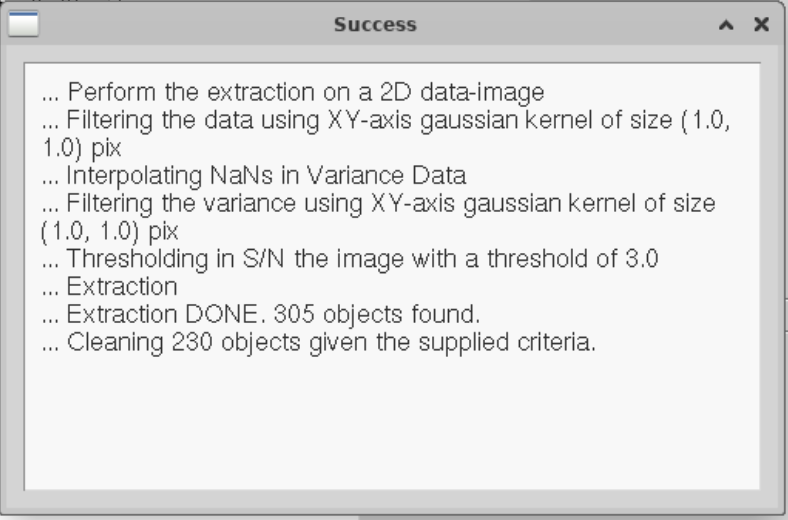
Output summary of successful extraction (Example).
Run generation of images by command line
Basic Usage (for 3D data only):
Make_Im_SHINE <Datacube> <Datavarcube> --input <input-file> --output <output-file>
Example using a 3D mask for selecting voxels:
Make_Im_SHINE ../Cubes/Datacube.fits ../Cubes/Cubelabels.fits --Id [2,5,9] --outdir ../Dataproducts/ --itype flux --writeout
Example using a 3D mask for selecting one single object and the associated pseudo narrow-band around it (only for one single Id):
Make_Im_SHINE ../Cubes/Datacube.fits ../Cubes/Cubelabels.fits --Id [2] --outdir ../Dataproducts/ --itype flux --nls -1 --nlsadd 2 --writeout
Example to create a narrow band image:
Make_Im_SHINE ../Cubes/Datacube.fits --outdir ../Dataproducts/ --itype flux --writeout
Command line arguments for Make_IM_Shine:
General Arguments:
-h, --help: Show this help message and exit.
Input Control Arguments:
cube: Path of the input datacube. Expected to be in extension 0, unlessextcubis defined.labelsCube: Path of the cube with labels. Expected to be in extension 0, unlessextlabelsis defined.--Id: The IDs of the grouped voxels to be used for the surface brightness image extraction. If a list is passed, all the valid IDs will be stacked into the final image. If[-1](default), stacks all the IDs in thelabelsCube.--itype: Type of image to produce. Allowed values:flux(default),mean, ormedian.--extcub: Specifies the HDU index in the FITS file cube to use for data extraction (default=0).--extlabels: Specifies the HDU index in the FITS file labels to use for labels data extraction (default=0).--nsl: Pseudo narrow-band: selects the provided layer associated with the object as the central layer from which the pseudo narrow-band is built. If-1, it selects the mean layer of the object. Use this only iflen(Id)=1. Default is-2(no noise layers).--nsladd: Pseudo narrow-band: specifies how many layers to collapse adjacent to the selected central one (default=0).
Output Control Arguments:
--outdir: Output directory path (default=``./``).--writeout: If set, writes the flux image and the associated variance image. The file is saved asdataname.IMAGE.fits.--addname: Optional suffix to append to the base name of the output file. This string will be added after the default filename (e.g.,fluxor other predefined parts) and before the file extension. Useful for distinguishing different versions or types of output files.
Run generation of images using Python
Make_Im_SHINE.py can be also used in a Python code. The parameters that can be used are the arguments described in the previous paragraph.
import Make_Im_SHINE

# Make an image using a cube of labels (e.g. the output of SHINE extraction) collapsing only the voxels associated with Id = 45. No pseudo narrow-band image around the object.
img = Make_Im_SHINE('../Data/Datacube.fits', labelsCube='../Data/Labelscube.fits', Id=[45], extcub=0, extlabels=0, itype='flux', outdir='../Dataproducts', writeout=True)

# Make an image using a cube of labels (e.g. the output of SHINE extraction) collapsing only the voxels associated with Id = 45. A pseudo narrow-band image of 5 layers around the mean layer of the object is extracted.
img = Make_Im_SHINE('../Data/Datacube.fits', labelsCube='../Data/Labelscube.fits', Id=[45], extcub=0, extlabels=0, itype='flux', outdir='../Dataproducts', writeout=True, nsl=-1, nsladd=2)

# Make an image using a cube of labels (e.g. the output of SHINE extraction) collapsing all the Ids.
img = Make_Im_SHINE('../Data/Datacube.fits', labelsCube='../Data/Labelscube.fits', Id=[-1], extcub=0, extlabels=0, itype='flux', outdir='../Dataproducts', writeout=True)

# Make a narrow band image, using all the user provided cube. It can be used SHINE.subcube to select the desired slice to collapse.
img = Make_Im_SHINE('../Data/Datacube.fits', extcub=0, itype='flux', outdir='../Dataproducts', writeout=True)
Changelog
1.1.0 - 20-01-2025
New version fully adapted for 2D image extraction with new features.
1.0.0 - 10-12-2024
First public release.
Contributing
If you are interested in contributing to the project, please contact us and follow these steps:
Fork the repository on GitHub.
Create a new branch for your feature/bugfix.
Submit a pull request.
API
This section lists the useful available functions in the SHINE module.
SHINE.runextraction: This function performs the extraction process using the specified parameters.SHINE.subcube: This function extracts a portion of the cube based on user-specified criteria.SHINE.extract: This function applies the CC3D connected components algorithm to the cube/image, identifying S/N-based voxels (3D) or pixels (2D) that have been selected.SHINE.generate_catalogue: This function generates a catalogue associated with the labeled cube/image extracted.
License
Copyright (C) 2024 The Authors
This program is free software; you can redistribute it and/or modify it under the terms of the GNU General Public License as published by the Free Software Foundation; either version 2 of the License, or (at your option) any later version. This program is distributed in the hope that it will be useful, but WITHOUT ANY WARRANTY; without even the implied warranty of MERCHANTABILITY or FITNESS FOR A PARTICULAR PURPOSE. See the GNU General Public License.